# 浏览器中的原生 ESM
> 通过 script[type=module] ,可直接在浏览器中使用原生 ESM 。这也使得前端不打包 ( Bundless ) 成为可能。 由于前端跑在浏览器中,因此它也只能从 URL 中引入 Package 1. 绝对路径: https://cdn.sykpack.dev/lodash 1. 相对路径: ./lib.js 现
- 发布于: 2019-08-09
- 更新于: 2026-09-30
- 原文: https://shanyue.tech/posts/frontend-engineering/esm/
- 标签: frontend-engineering
- 专栏: 前端工程化
---
## Native Import: Import from URL
通过 `script[type=module]`,可直接在浏览器中使用原生 `ESM`。这也使得前端不打包 (`Bundless`) 成为可能。
```html
```
由于前端跑在浏览器中,**因此它也只能从 URL 中引入 `Package`**
1. 绝对路径: `https://cdn.sykpack.dev/lodash`
1. 相对路径: `./lib.js`
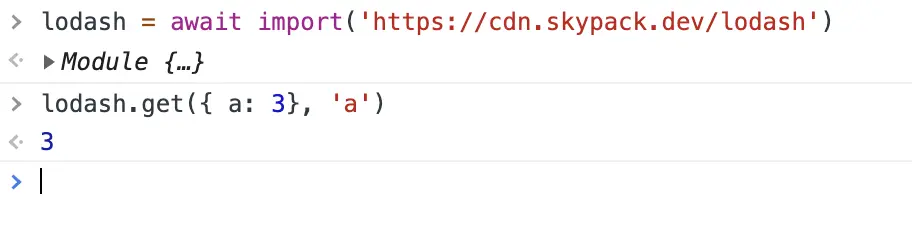
现在打开浏览器控制台,把以下代码粘贴在控制台中。由于 `http import` 的引入,你发现你调试 `lodash` 此列工具库更加方便了。
```js
> lodash = await import('https://cdn.skypack.dev/lodash')
> lodash.get({ a: 3 }, 'a')
```
## ImportMap
但 `Http Import` 每次都需要输入完全的 URL,相对以前的裸导入 (`bare import specifiers`),很不太方便,如下例:
```js
import lodash from "lodash";
```
它不同于 `Node.JS` 可以依赖系统文件系统,层层寻找 `node_modules`
```bash
/home/app/packages/project-a/node_modules/lodash/index.js
/home/app/packages/node_modules/lodash/index.js
/home/app/node_modules/lodash/index.js
/home/node_modules/lodash/index.js
```
在 ESM 中,可通过 `importmap` 使得裸导入可正常工作:
```html
```
此时可与以前同样的方式进行模块导入
```js
import lodash from 'lodash'
import("lodash").then(_ => ...)
```
那么通过裸导入如何导入子路径呢?
```html
```
## Import Assertion
通过 `script[type=module]`,不仅可引入 Javascript 资源,甚至可以引入 JSON/CSS,示例如下
```html
```
## 构建工具
## 支持 ES 的 Package 过少?
```bash
```
## 如何将 Commonjs 转化为 ESM
> 本篇文章/答案本计划是三四百字,没想到最后越写越多,写了一千字。
由于 Bundless 构建工具的兴起,要求所有的模块都是 ESM 模块化格式。
目前社区有一部分模块同时支持 ESM 与 CommonJS,但仍有许多模块仅支持 CommonJS/UMD,因此将 CommonJS 转化为 ESM 是全部模块 ESM 化的过渡阶段。
## ESM 与 CommonJS 的导入导出的不同
在 ESM 中,导入导出有两种方式:
1. 具名导出/导入: `Named Import/Export`
1. 默认导出/导入: `Default Import/Export`
代码示例如下:
```js
// Named export/import
export { sum };
import { sum } from "sum";
// Default export/import
export default sum;
import sum from "sum";
```
而在 CommonJS 中,导入导出的方法只有一种:
```js
module.exports = sum;
```
而所谓的 `exports` 仅仅是 `module.exports` 的引用而已
```js
// 实际上的 exports
exports = module.exports;
// 以下两个是等价的
exports.a = 3;
module.exports.a = 3;
```
> PS: 一道题关于 `exports` 与 `module.exports` 的区别,以下 `console.log` 输出什么
>
> ```js
> // hello.js
> exports.a = 3;
> module.exports.b = 4;
>
> // index.js
> const hello = require("./hello");
> console.log(hello);
> ```
> 再来一道题:
>
> ```js
> // hello.js
> exports.a = 3;
> module.exports = { b: 4 };
>
> // index.js
> const hello = require("./hello");
> console.log(hello);
> ```
正因为有二者的不同,因此在二者转换的时候有一些兼容问题需要解决。
## exports 的转化
正因为,二者有所不同,当 exports 转化时,既要转化为 `export {}`,又要转化为 `export default {}`
```js
// Input: index.cjs
exports.a = 3;
// Output: index.mjs
// 此处既要转化为默认导出,又要转化为具名导出!
export const a = 3;
export default { a };
```
如果仅仅转为 `export const a = 3` 的具名导出,而不转换 `export default { a }`,将会出现什么问题?以下为例:
```js
// Input: CJS
exports.a = 3; // index.cjs
const o = require("."); // foo.cjs
console.log(o.a); // foo.cjs
// Output: ESM
// 这是有问题的错误转换示例:
// 此处 a 应该再 export default { a } 一次
export const a = 3; // index.mjs
import o from "."; // foo.mjs
console.log(o.a); // foo.mjs 这里有问题,这里有问题,这里有问题
```
## module.exports 的转化
对于 `module.exports`,我们可以遍历其中的 key (通过 AST),将 key 转化为 `Named Export`,将 `module.exports` 转化为 `Default Export`
```js
// Input: index.cjs
module.exports = {
a: 3,
b: 4,
};
// Output: index.mjs
// 此处既要转化为默认导出,又要转化为具名导出!
export default {
a: 3,
b: 4,
};
export const a = 3;
export const b = 4;
```
如果 `module.exports` 导出的是函数如何处理呢,特别是 `exports` 与 `module.exports` 的程序逻辑混合在一起?
以下是一个正确的转换结果:
```js
// Input: index.cjs
module.exports = () => {}
exports.a = 3
exports.b = 4
// Output: index.mjs
const sum = () => {}
sum.a = 3
sum.b = 4
export const a = 3
export const b = 4
export default = sum
```
也可以这么处理,将 `module.exports` 与 `exports` 的代码使用函数包裹起来,此时我们无需关心其中的逻辑细节。
```js
var esm$1 = { exports: {} };
(function (module, exports) {
module.exports = () => {};
exports.a = 3;
exports.b = 4;
})(esm$1, esm$1.exports);
var esm = esm$1.exports;
export { esm as default };
```
## 一些复杂的转化
ESM 与 CommonJS 不仅仅是简单的语法上的不同,它们在思维方式上就完全不同,因此还有一些较为复杂的转换,本篇先不做谈论,感兴趣的可以去我的博客上查找相关文章。
1. 如何处理 `__dirname`
1. 如何处理 `require(dynamicString)`
1. 如何处理 CommonJS 中的编程逻辑,如下
以下代码涉及到编程逻辑,由于 `exports` 是一个动态的 Javascript 对象,而它自然可以使用两次,那应该如何正确编译为 ESM 呢?
```js
// input: index.cjs
exports.sum = 0;
Promise.resolve().then(() => {
exports.sum = 100;
});
```
以下是一种不会出问题的代码转换结果
```js
// output: index.mjs
const _default = {};
let sum = (_default.sum = 0);
Promise.resolve().then(() => {
sum = _default.sum = 100;
});
export default _default;
export { sum };
```
## CommonJS To ESM 的构建工具
CommonJS 向 ESM 转化,自然有构建工具的参与,比如
- [@rollup/plugin-commonjs](https://github.com/rollup/plugins/tree/master/packages/commonjs)
甚至把一些 CommonJS 库转化为 ESM,并且置于 CDN 中,使得我们可以直接使用,而无需构建工具参与
-
-